Upgrading from BMS to Autotask Ultimate
BMS has helped many MSPs successfully run their businesses and continues to be a solid PSA platform. As your organization grows in size and complexity, however, your needs often evolve toward deeper automation, richer analytics, and tighter alignment with the broader Kaseya ecosystem.
Autotask Ultimate is designed for that next stage of maturity: giving you more intelligence, more automation, and a more modern experience across your entire service operation-while building on the strengths you already have in BMS.
This topic explains:
- What you gain by moving from BMS to Autotask Ultimate.
- Where Autotask extends what you can do today with BMS in automation, reporting, and integrations.
- Why many growing MSPs choose Autotask as their long-term strategic PSA.
Built for visibility, intelligence, and effortless automation
Both BMS and Autotask deliver the core PSA capabilities MSPs rely on every day. Autotask Ultimate builds on that foundation to give every role-technicians, service managers, finance, leadership-more of the real-time visibility and control required at larger scale.
Key advantages Autotask provides beyond BMS
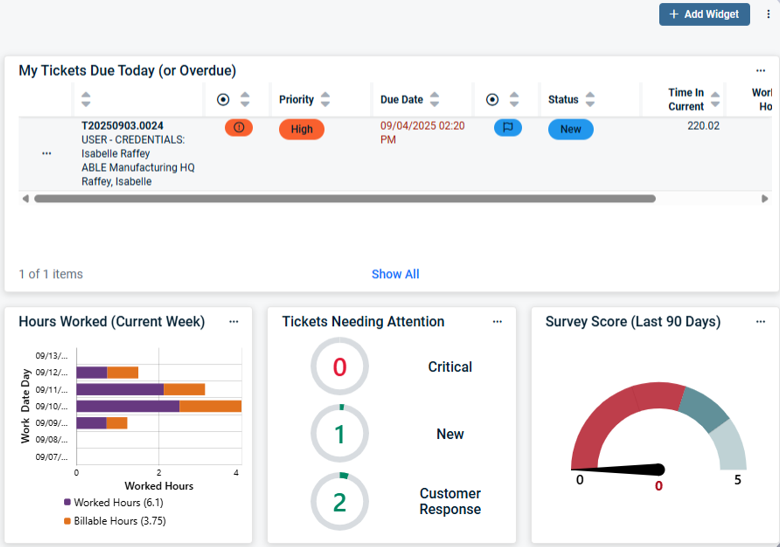
- Dashboards instead of only static reports
-
Live, role-based dashboards that refresh automatically.
-
Visual insights into tickets, SLAs, utilization, margins, and more.
-
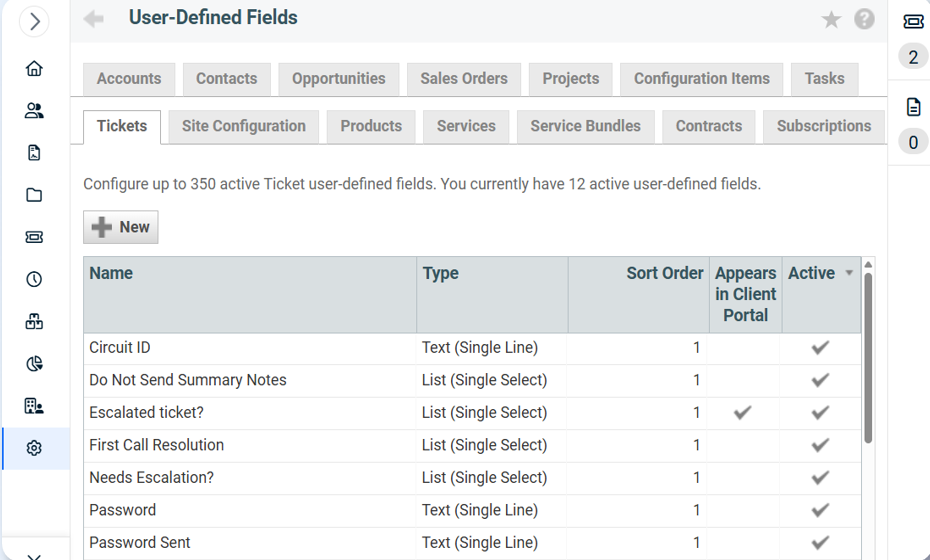
- Deep customization with User Defined Fields (UDFs)
-
Add custom fields across modules to reflect your exact processes and reporting needs.
-
Staying on BMS continues to give you the PSA capabilities you know today. Upgrading to Autotask Ultimate layers in more intuitive workflows, richer dashboards, and additional customization that can make day-to-day decision-making faster and onboarding easier as your team grows.
Smarter service with AI-driven ticket triage
Both platforms support effective ticket management. Autotask Ultimate adds an additional layer of AI and automation designed to handle higher ticket volumes with greater consistency.
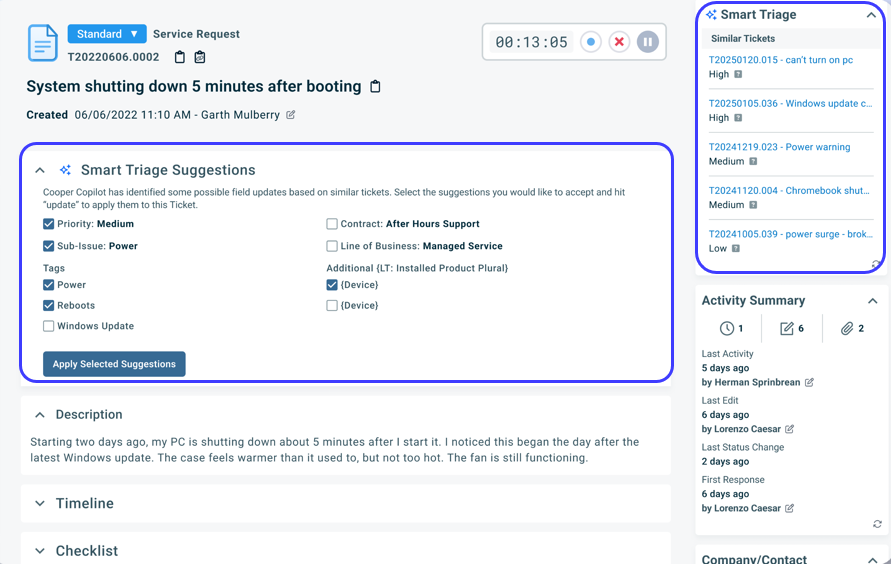
Smart Triage with Agentic AI
Autotask Ultimate uses Cooper Copilot’s AI across the PSA and extends it with Smart Triage to help:
-
Auto-categorize tickets using contextual data.
-
Detect duplicates and surface related issues.
-
Suggest missing details and recommended updates.
-
Automate ticket actions, including resource assignment, so the right tech gets the right ticket faster.
Business impact
- Reduced manual triage effort.
- Faster first response and resolution.
- More consistent handling of tickets across the team.
BMS can certainly support a strong, process-driven service desk. Autotask Ultimate adds AI-driven triage and automated assignment, which becomes increasingly valuable as ticket volumes and team sizes grow and you look to standardize service quality at scale.
Umbrella contracts: one contract, all services
BMS can handle client agreements effectively. As your offerings and pricing become more sophisticated, Autotask’s umbrella contracts and related capabilities are designed to simplify and centralize that complexity.
Autotask umbrella contract advantages
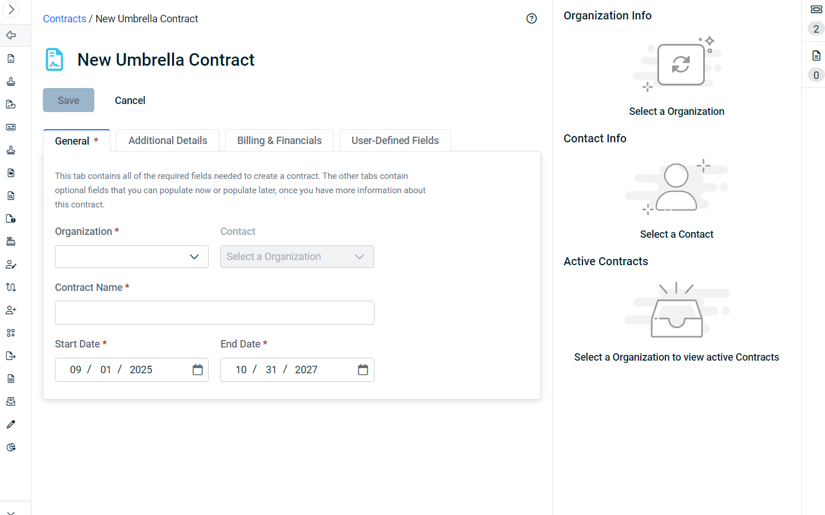
- Single contract per customer that can encompass:
- Recurring services.
- Time & materials.
- Different agreement types and rules.
- Centralized control over:
- Pricing.
- Renewal terms.
- Indexing rules (such as annual increases).
- New service packaging capabilities:
- Bundle services together.
- Track cost per item for more granular profitability reporting.
- Quick access to related items:
- Tickets, invoices, activities, and more in one place.
BMS can absolutely support MSPs with more straightforward contract structures. Autotask Ultimate becomes especially compelling as contract models, pricing strategies, and profitability analysis requirements become more complex and you want a single, flexible contract framework to manage those changes.
Smart Accounting Hub and modern billing experiences
BMS supports core billing needs for many MSPs. Autotask Ultimate is where Kaseya is concentrating broader, long-term innovation in billing and financial workflows.
Autotask is actively expanding capabilities such as:
- Smart Accounting Hub with deeper QuickBooks Online integration.
- Multi-user support and broader financial workflows.
- E-invoice support and more modern billing experiences for your clients.
If your current billing processes in BMS are working well for your present scale, there is no immediate requirement to change. As you plan for more advanced financial workflows, tighter accounting integration, and e-invoicing, Autotask Ultimate offers a more future-focused foundation.
A deeper hub for the Kaseya 365 Ops ecosystem
BMS integrates with many Kaseya products and can be a strong centerpiece for your current stack. Autotask Ultimate is being developed as the primary PSA anchor for the Kaseya 365 Ops ecosystem, with deeper, end-to-end workflows.
Native integrations that matter
- Kaseya Quote Manager
- Deep workflow integrations for quoting and sales operations.
- Inventory sync to keep quotes and billing aligned.
- Ability to create Autotask opportunities and sync contracts for IT roadmaps.
- ConnectBooster (Electronic Payments)
- Embedded electronic payments from Autotask.
- “Pay now” capability directly from invoices.
- Encourages faster payment cycles and reduces manual AR follow-up.
- myITprocess (Strategic IT roadmapping)
- Connects IT roadmaps to Autotask opportunities and contracts.
- Aligns vCIO/strategy conversations with real, trackable revenue.
If you are already seeing strong value from your current BMS integrations, that’s a good sign your PSA is well-implemented. Moving to Autotask Ultimate lets you take fuller advantage of Kaseya’s newest and deepest integrations, especially where those workflows are being optimized with Autotask as the primary hub.
Open API, integrations, and sandbox environment
BMS and Autotask both support integration-friendly operations. Autotask Ultimate is designed with an open API and ecosystem-first mindset for organizations that want to push customization and automation further.
Autotask integration benefits
- Easy-to-access, well-documented API.
- Powers over 200+ third-party integrations.
- Makes it straightforward to build custom connections and automate around your unique toolset.
Sandbox environment
Autotask Ultimate offers a sandbox environment (on request) so you can:
- Test configuration changes safely.
- Validate new workflows and integrations.
- Train staff in a non-production environment.
If your current level of integration and change management in BMS is meeting your needs, you can absolutely continue to operate successfully. As your appetite for experimentation, customization, and continuous improvement grows, Autotask’s ecosystem depth and sandbox capabilities give you more room to innovate with less risk.
Roadmap focus and ongoing innovation
BMS remains supported and continues to serve many MSPs well. At the same time, Autotask Ultimate is the focus of Kaseya’s most aggressive PSA innovation.
Autotask’s roadmap emphasizes:
- AI-powered features
- Cooper Copilot AI assistant.
- Smart ticket summaries and resolution summaries.
- Smart writing assistance for ticket and customer communication.
- Advanced Smart Triage and resource assignment.
- Multi-language support.
- User experience upgrades
- Navigation refresh (left & top).
- Updated search, dashboards, and worklists.
- UI updates focused on speed, simplicity, and usability.
- Billing and financials
- Smart Accounting Hub.
- QuickBooks Online integration.
- Multi-user financial support.
- Operations and planning
- Resource Planner for better utilization and staffing decisions.
If BMS is meeting your needs today, you can confidently continue to run your business. When you’re ready to lean into AI, advanced automation, and the latest UX and financial capabilities, Autotask Ultimate is where those investments are being delivered first and most deeply.
Migration designed to protect your operations
A natural concern in moving from a PSA that works today is disruption. Autotask’s migration and onboarding process is designed to preserve what’s working in BMS while positioning you to benefit from Autotask’s additional capabilities.
Migration is easier than ever
You can bring over exactly what you need.
Data migration points available today
- Accounts, Contacts, Branches, Employees.
- Issue Types & Sub-Issue Types, Priorities, Queues, Statuses, Ticket Sources, Work Types.
- Tickets, Ticket Notes, Ticket Time Entries.
Data migration points coming soon
- Financial data.
- Contracts.
- Invoices.
- Projects.
Data that cannot be migrated automatically
- Ticket attachments.
- Alarm tickets.
- Custom fields.
Migration approach
- Selective: Move what’s valuable; leave behind legacy clutter.
- Structured: Intuitive mapping ensures clean data structuring.
- Phased: Incremental updates allow staged transitions—for example, move service delivery first, then projects.
The focus is on:
- Keeping your business running during the transition.
- Rebuilding workflows in a better way, not just copying what you had.
- Helping your team adopt new features like dashboards, umbrella contracts, and Smart Triage.
If you are not ready for a transition yet, you can continue to operate on BMS and plan a move when it best aligns with your internal timing and growth plans.
Summary: Extending what works today into your next stage of growth
If you’re running BMS today, you already have a proven PSA foundation. The decision to upgrade to Autotask Ultimate is less about fixing something that’s “broken” and more about extending your capabilities as your business evolves.
By upgrading to Autotask Ultimate, you gain:
- Real-time dashboards and better visibility across service, finance, and operations.
- AI-powered Smart Triage and resource assignment to speed response and resolution.
- Umbrella contracts and Smart Accounting capabilities for simplified, scalable billing.
- Deeper Kaseya 365 Ops integrations (Kaseya Quote Manager, ConnectBooster, myITprocess).
- An open API with 200+ integrations and a sandbox for safe testing.
- A platform that is the primary focus of ongoing innovation and roadmap investment.
If you choose to remain on BMS for now:
- You can continue to run reliably on a PSA you know well.
- You retain the flexibility to move to Autotask Ultimate when your growth, automation, or integration needs signal that it’s time.
For MSPs planning significant growth over the next 12–24 months, it’s worth evaluating Autotask Ultimate through the lens of:
- Your growth goals (new clients vs. expansion, added technicians).
- The automation, AI, and reporting capabilities you’ll need to support that growth.
- How well your current PSA—BMS or otherwise—aligns with your long-term roadmap.
The upgrade decision is ultimately about turning your PSA into a long-term growth platform. BMS has helped you get to where you are today; Autotask Ultimate is designed to help carry you into what’s next.


