Sync is not pulling anything from QuickBooks
Issue
Kaseya's BMS QuickBooks Desktop Sync is not pulling anything from QuickBooks.
Cause
There could be many reasons for this and among that one is not having the proper administrative credentials.
Resolution
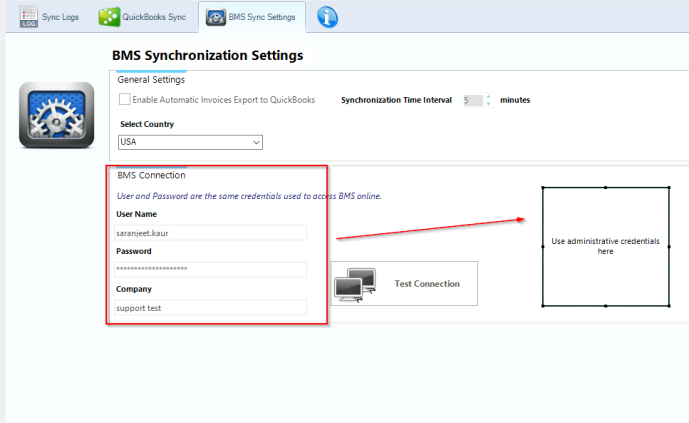
- Check to see if the credentials which you are trying to log to the BMS Sync tool have administrative rights:
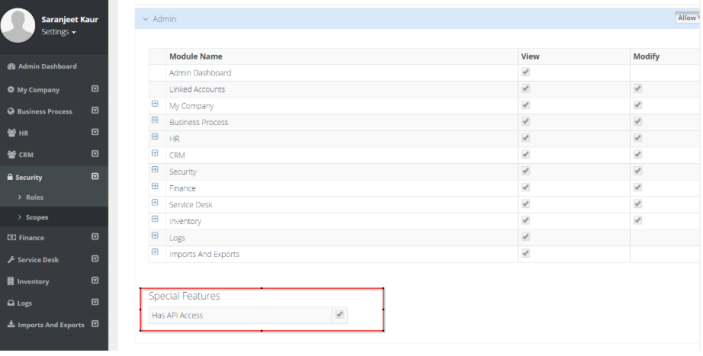
- Administrative credentials provided must have below special feature assigned to the security role type:
- Navigate to Edit > Preferences in QuickBooks desktop and check the Third Party Access tab; here you will receive several messages indicating that your account lacks sufficient privileges to make changes here.
- Change to the "Admin" user and switch to a single-user mode and then try the sync again.
NOTE Look for an Application Certificate window displayed elsewhere on your system. The window is asking you to confirm Quickbooks Sync Tool access to Quickbooks Desktop:
- Select "Yes" whenever the Quickbooks company file is an open option
- Click "Continue"
- Confirm what the proceed message box displays
- Click "Yes".
- If the above does not help then please contact Kaseya Support with the logs as mentioned below:


